> For the complete documentation index, see [llms.txt](https://docs.neuron-ai.dev/llms.txt). Markdown versions of documentation pages are available by appending `.md` to page URLs; this page is available as [Markdown](https://docs.neuron-ai.dev/neuron-v3/agent/structured-output.md).
# Structured Output
Enforce the Agent output based on the provided schema.
{% hint style="warning" %}
#### Coding Agent Skill
Use **`/neuron-structured-output`** to teach your coding agent how to leverage Neuron capabilities ton reliably extract structured output from the LLM response.
[AI-Assisted Development](/neuron-v3/overview/agentic-development.md)
{% endhint %}
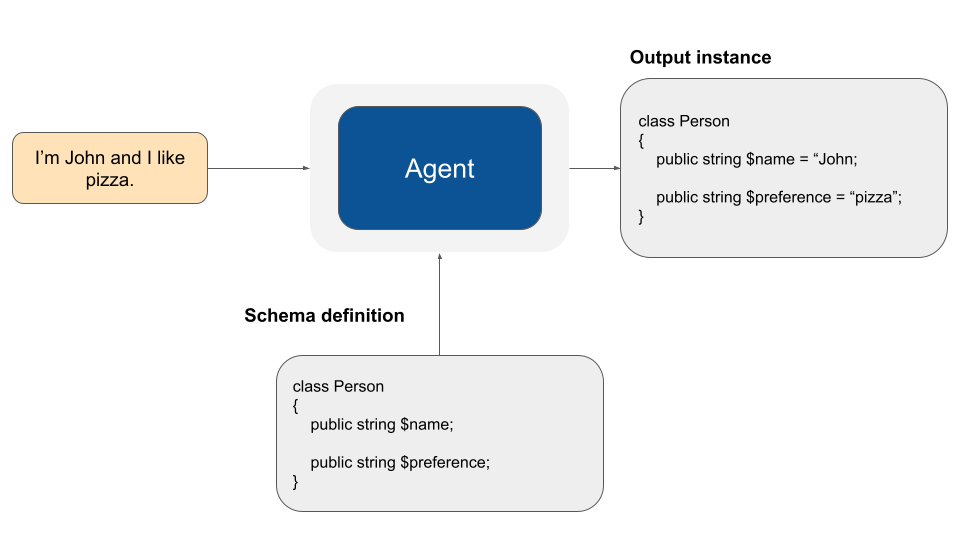
There are many use cases where we need Agents to understand natural language, but output in a *structured format*. One common use-case is extracting data from text to insert into a database or use with some other downstream system. This guide covers how Neuron allows you to enforce structured outputs from the agent.
{% embed url="" %}
### How to use Structured Output
The central concept is that the output structure of LLM responses needs to be represented in some way. The schema that Neuron validates against is defined by PHP type hints. Basically you have to define a class with strictly typed properties:
```php
setThreadId('chat_id')
->structured(
new UserMessage("I'm John and I like pizza!"),
Person::class
);
echo $person->name.' like '.$person->preference;
// John like pizza
```
### Default output class
You can also encapsulate the output format into the Agent implementation, so it will be the Agent standard output format. You always need to call the `structured()` method to require strict output.
```php
use NeuronAI\Chat\Messages\UserMessage;
// Encapsulate the default output format
class MyAgent extends Agent
{
...
protected function getOutputClass(): string
{
return Person::class;
}
}
// Always use the structured method if you want to get structured output
$person = MyAgent::make()
->setThreadId('chat_id')
->structured(new UserMessage("I'm John and I like pizza"));
echo $person->name.' like '.$person->preference;
// John like pizza
```
### Control the output generation
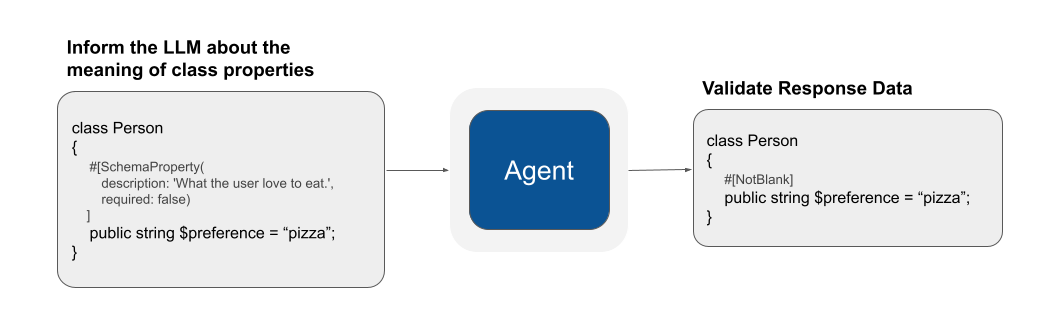
Neuron requires you to define two layers of rules to create the structured output class.
The first is the `SchemaProperty` attribute that allows you to control the JSON schema sent to the LLM to understand the required data format.
The second layer is validation. Validation attributes will ensure data gathered from the LLM response are consistent with your requirements.
### SchemaProperty
The `SchemaProperty` attribute allows you to define the JSON schema parameters of each property:
```php
new SchemaProperty(
description: translate('invoice.customer_name'), // get translation
required: true,
),
'total' => new SchemaProperty(
description: 'Total amount in '.config('billing.currency'), // From app config
min: 0,
),
];
}
}
```
The resolution rules:
* A property listed in `schemaProperties()` uses that `SchemaProperty` object (it **replaces** the attribute entirely for that property — the two aren't merged field by field).
* A property not listed falls back to its `#[SchemaProperty]` attribute, if any.
* Everything works identically to attributes downstream, including `anyOf` — so you could even build the class list for a polymorphic array dynamically, and the `Deserializer` will hydrate it correctl
### Nested Class
You can construct complex output structures using other PHP objects as a property type. Following the example of a the `Person` class we can add the `address` property typed as another structured class.
```php
structured(
new UserMessage("I'm John and I want a pizza at st. James Street 00560!"),
Person::class
);
echo $person->name.' like '.$person->preference.'. Address: '.$person->address->street;
// John like pizza. Address: st.James Street
```
## Array
If you declare a property as an array, Neuron assumes the list of items to be a list of string. If you want the array to contains a list of other structured objects you can specify that using the `anyOf` argument:
```php
structured(
messages: new UserMessage("I'm John and I like pizza!"),
class: Person::class,
maxRetries: 3
);
```
If you work with a less capable LLM consider to use a number of retries balancing the probability to get e valid answer, and the potential token consumption.
You can disable retry just passing zero. It will be a one shot attempt:
```php
$person = MyAgent::make()->structured(
messages: new UserMessage("I'm John and I like pizza!"),
class: Person::class,
maxRetries: 0
);
```
## Monitoring & Debugging
Many of the applications you build with Neuron will contain multiple steps with multiple invocations of LLM calls. As these applications get more and more complex, it becomes crucial to be able to inspect what exactly is going on inside your agentic system. The best way to do this is with [Inspector](https://inspector.dev/).
{% embed url="" %}
## Validation Rules
Since LLMs are not-deterministic systems and the consistency of their output can be highly influenced by the quality of the context they have as input, and they can still hallucinate, we provide a set of validation rules you can add to structured class properties to instruct Neuron verify the final set of data generated by the LLM.
Validation rules allows Neuron to resend the generation request to the LLM multiple times with a detailed report of what was wrong if one or more properties are not valid, until it reaches the [maxRetries](#max-retries) value.
If you don't define any validation rule, the data extracted from the LLM response will be filled into the structured output class directly.
### #\[NotBlank]
The property under validation cannot be blank. It accept the `allowNull` flag to treat explicitly null value as empty equivalent or not.
```php
namespace App\Neuron\Output;
use NeuronAI\StructuredOutput\Validation\Rules\NotBlank;
class Person
{
#[NotBlank(allowNull: false)]
public string $name;
}
```
### #\[Length]
Determine if the length of a `string` match the given criteria:
```php
namespace App\Neuron\Output;
use NeuronAI\StructuredOutput\Validation\Rules\Length;
class Person
{
#[Length(min: 1, max: 10)]
public string $name;
#[Length(exactly: 5)]
public string $zip_code;
}
```
### #\[WordsCount]
Determine if the number of words in a `string` match the given criteria:
```php
namespace App\Neuron\Output;
use NeuronAI\StructuredOutput\Validation\Rules\WordsCount;
class Person
{
#[WordsCount(exactly: 10)]
public string $title;
#[WordsCount(min: 1, max: 10)]
public string $content;
}
```
### #\[Count]
Determine if the size of an `array` match the given criteria:
```php
namespace App\Neuron\Output;
use NeuronAI\StructuredOutput\Validation\Rules\Count;
class Person
{
#[Count(min: 1, max: 3)]
public array $dogs;
#[Count(exactly: 1)]
public array $children;
}
```
### #\[EqualTo] - #\[NotEqualTo]
These rules have the same structure and meaning, and accept a single argument to define the value to compare against. The property under validation must be strictly equal (*#\[EqualTo]*) or different (*#\[NotEqualTo]*) than the reference value:
```php
namespace App\Neuron\Output;
use NeuronAI\StructuredOutput\Validation\Rules\EqualTo;
use NeuronAI\StructuredOutput\Validation\Rules\NotEqualTo;
class Person
{
#[EqualTo(reference: 'Rome')]
public string $city;
#[NotEqualTo(reference: '00502')]
public string $zip_code;
}
```
### #\[GreaterThan] - #\[GreaterThanEqual]
These rules have the same structure and meaning, and accept a single argument to define the value to compare against. The property under validation must be strictly greater (*#\[GreaterThan]*) or equal (*#\[GreaterThanEqual]*) than the reference value:
```php
namespace App\Neuron\Output;
use NeuronAI\StructuredOutput\Validation\Rules\GreaterThan;
use NeuronAI\StructuredOutput\Validation\Rules\GreaterThanEqual;
class Person
{
#[GreaterThan(reference: 17)]
public int $age;
#[GreaterThanEqual(reference: 1)]
public int $cars;
}
```
### #\[LowerThan] - #\[LowerThanEqual]
These rules have the same structure and meaning, and accept a single argument to define the value to compare against. The property under validation must be strictly lower (*#\[LowerThan]*) or equal (*#\[LowerThanEqual]*) than the reference value:
```php
namespace App\Neuron\Output;
use NeuronAI\StructuredOutput\Validation\Rules\LowerThan;
use NeuronAI\StructuredOutput\Validation\Rules\LowerThanEqual;
class Person
{
#[LowerThan(reference: 50)]
public int $age;
#[LowerThanEqual(reference: 1)]
public int $cars;
}
```
### #\[OutOfRange]
Determin if a `number` is out of the given range:
```php
namespace App\Neuron\Output;
use NeuronAI\StructuredOutput\Validation\Rules\InRange;
class Person
{
#[OutOfRange(min: 18, max: 35)]
public int $age;
// The strict argument force to stay stricly out of the range limits
#[OutOfRange(min: 48, max: 54, strict: true)]
public int $size;
}
```
### #\[IsFalse] - #\[IsTrue]
The property under validation must have exactly the boolean value defined by the rule:
```php
namespace App\Neuron\Output;
use NeuronAI\StructuredOutput\Validation\Rules\IsFalse;
use NeuronAI\StructuredOutput\Validation\Rules\IsTrue;
class Phone
{
#[IsFalse]
public bool $iphone;
#[IsTrue]
public bool $refurbed;
}
```
### #\[IsNull] - #\[IsNotNull]
The property under validation must respect the nullable condition defined by the rule:
```php
namespace App\Neuron\Output;
use NeuronAI\StructuredOutput\Validation\Rules\IsNotNull;
use NeuronAI\StructuredOutput\Validation\Rules\IsNull;
class Phone
{
#[IsNotNull]
public string $brand;
#[IsNull]
public ?string $test;
}
```
### #\[Json]
The property under validation must contains a valid JSON string:
```php
namespace App\Neuron\Output;
use NeuronAI\StructuredOutput\Validation\Rules\Json;
class Person
{
#[Json]
public string $address;
}
```
### #\[Url]
The property under validation must contains a valid URL:
```php
namespace App\Neuron\Output;
use NeuronAI\StructuredOutput\Validation\Rules\Url;
class Person
{
#[Url(schemes: ['http', 'https'])]
public string $website;
}
```
### #\[Email]
The property under validation must contains a valid Email address:
```php
namespace App\Neuron\Output;
use NeuronAI\StructuredOutput\Validation\Rules\Email;
class Person
{
#[Email]
public string $email;
}
```
### #\[IpAddress]
The property under validation must contains a valid IP address:
```php
namespace App\Neuron\Output;
use NeuronAI\StructuredOutput\Validation\Rules\IpAddress;
class Person
{
#[IpAddress]
public string $ip;
}
```
### #\[ArrayOf]
The property under validation must be an array that contains all of the given type of object. Notice that you also need to add the doc-block in order to make the agent able to instance the correct class. Use the full class namespace in the doc-block.
```php
namespace App\Neuron\Output;
use NeuronAI\StructuredOutput\Validation\Rules\ArrayOf;
class Person
{
/**
* @var \App\Neuron\Output\Tag[]
*/
#[ArrayOf(Tag::class)]
public array $tags;
}
```
### #\[Regex]
The property under validation must respect the given regular expression.
```php
namespace App\Neuron\Output;
use NeuronAI\StructuredOutput\Validation\Rules\Regex;
class Coupon
{
#[Regex('/^[A-Z]{2}\d{4}$/')]
public string $code;
}
```
## Custom Validation Rules
Validation rules are PHP Attributes, so to create a new one you should extend the AbstractValidationRule of the framework and mark the class as a PHP Attribute:
```php
namespace App\Neuron\Output;
use Attribute;
use NeuronAI\StructuredOutput\Validation\Rules\AbstractValidationRule;
#[Attribute(Attribute::TARGET_PROPERTY)]
class MyFormatRule extends AbstractValidationRule
{
public function __construct(protected string $format)
{
}
public function validate(string $name, mixed $value, array &$violations): void
{
if (!is_string($value)) {
$violations[] = $this->buildMessage($name, '{name} must be a string.');
} else if (!$this->respectFormat($this->format, $value)) {
$violations[] = $this->buildMessage(
$name,
'{name} must match the format {format}',
['format' => $this->pattern]
);
}
}
protected function respectFormat(string $value)
{
...
}
}
```
Now you can use the rule in your structured output class:
```php
namespace App\Neuron\Output;
class Route
{
#[MyFormatRule('apps/{id}/show')]
public string $path;
}
```